


In today’s ultra‑competitive digital landscape, failing to plan is planning to fade out. That’s why a robust social media content calendar isn’t just nice to have, it’s essential. Whether you’re a solo creator, a small business, or part of a full‑scale marketing team, a well‑structured content calendar for social media helps you stay consistent, strategic, and aligned across platforms. In this article I draw on years of content‑marketing practice (my own and with clients), and I’ll show you how to create a content calendar for social media, how to brainstorm social media content calendar ideas, and how to pick or adapt a Google Sheets social media content calendar template or social media content calendar template Excel.
What is a social media content calendar?
A social media content calendar example acts as a roadmap of your future posts across platforms: dates, times, channels, visuals, captions, hashtags, links, campaign tags, performance tracking everything in one view.
This allows you to coordinate campaigns, avoid ad‑hoc posting, maintain a consistent brand voice, plan around seasonal events, and free up time for creativity rather than daily scramble. As one source puts it: “A social media calendar should provide structure, not create rigidity.”
Why you need a social media content calendar
Here are the main benefits of creating a social media content calendar:
- Consistency: Many brands struggle with irregular posting; a calendar ensures regular presence.
- Time‑saving & planning: Instead of reacting day‑by‑day, you can plan weeks or months ahead.
- Cross‑team collaboration: When content creation, design, review and scheduling are in one shared calendar, workflows improve.
- Strategic alignment: Align posts with business goals, campaigns, fiscal calendars, launches, events.
- Performance tracking & optimization: By seeing what’s planned vs what’s posted and how it performs, you can optimize future content.
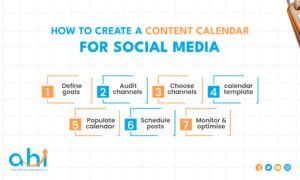
How to create a content calendar for social media
Here’s a step‑by‑step process to build your social media posting calendar.
Step 1 – Define your goals & KPIs
Start by asking what you want your social media to achieve (brand awareness, leads, traffic, community engagement) and define measurable KPIs (reach, engagement, click‑through, conversion).
- Clarify what role social media plays in your broader marketing strategy. Are you building brand awareness, supporting customer service, driving sales, or building community?
- Set specific, measurable, time‑bound KPIs for each platform. For example: Instagram: increase engagement rate to 4 % in 3 months; LinkedIn: generate 100 leads via social in next quarter.
- Align your content calendar structure around those KPIs: e.g., content buckets for awareness, conversion, retention.
Step 2 – Audit your social channels
Review your existing social media accounts which platforms perform best, what content works, what platforms may be redundant before planning.
- Look at what you already have: channels, followers, performance data, content types. Use “Five Ws” (Who, What, When, Where, Why) audit method.
- Identify platforms that don’t merit your effort and can be removed or deprioritised.
- Also audit your content themes/format: what kinds of posts have high engagement; what times of day.
- This audit sets the baseline for your calendar and ensures you don’t plan blindly.
Step 3 – Choose your channels, content types, posting cadence
Decide which social platforms you will use, what content formats (image, video, live, stories), and how often you will post each to set realistic cadence.
- Select platforms where your audience is active, and where your brand voice fits.
- Map content types: e.g., blog link posts, behind‑the‑scenes videos, user‑generated content, product posts, educational tips, polls.
- Decide posting frequency‑ realistic for your resources for example: Instagram 3x/week, LinkedIn 2x/week, TikTok 1x/week.
- Use content buckets/categories (themes): e.g., “Tip Tuesday”, “Throwback Thursday”, “Customer Story”, “Product Feature”. This adds variety and ensures you don’t get stuck repeating the same thing.
- This structured cadence and varied format make the calendar actionable.
Step 4 – Create the actual calendar template (Google Sheets, Excel or tool)
Choose a format (Google Sheets, Excel, or content‑calendar tool), build columns for date, platform, post copy, visual asset, status, link, owner, KPIs and upload or share it.
- Spreadsheet templates are versatile, low‑cost and widely used. There are multiple free options for both Google Sheets and Excel.
- Some of the typical columns: Date, Time, Channel/Platform, Content Type, Campaign/Theme, Copy/Text, Visual/Media Asset Link, Post Status (Idea→Draft→Scheduled→Published), Link/CTA, Hashtags/Mentions, Responsible Person, Notes/Results.
- You may also include a “Month view” tab and a “List view” tab, or a calendar monthly overview.
- Google Sheets social media content calendar template has the advantage of real‑time collaboration; social media content calendar template Excel is beneficial if your team uses MS Office and offline work.
- Choose version control wisely: ensure one master calendar, shared access or locked views.
Ensuring your calendar is structured with keywords for campaigns and consistent naming helps AI tools and scheduling systems interpret your content better.
Step 5 – Populate the calendar with ideas & map content themes
Brainstorm content ideas aligned with your themes and business goals, then map them over your calendar, noting timely events, campaign windows, industry holidays and evergreen content.
- Begin with your content buckets/themes and fill in ideas: e.g., “How‑to video”, “Testimonial post”, “Blog summary”, “Live Q&A”.
- Layer in seasonal and campaign events: product launches, holidays, awareness days, company milestones.
- Make space for evergreen content (posts that work any time) so you have fallback if campaign content falls through.
- Use colour‑coding or tags in the calendar to visually separate themes or content types.
- Build a “30‑day social media content calendar” plan (for example) and then roll it out into quarterly/annual plans.
- When planning, also introduce some white‑space for reactive or trending posts as noted: a calendar should allow flexibility.
Step 6 – Schedule and automate posts
Use your calendar to schedule posts via your preferred scheduling tool, and attach links/assets so that posts are ready to go ahead of time.
- Once posts are input in the calendar, assign deadlines for copy, visuals, review and scheduling.
- Connect to scheduling tools (e.g., Hootsuite, Sprout Social, or other SMMS) so your calendar flows into publish workflow.
- Set reminders for assets, approvals, posting times.
- The calendar becomes the “single source of truth” for social content across your team.
You can integrate prompt ideas (e.g., “chat gpt prompts for social media content calendar”) into your calendar so you allocate time for ideation with generative tools as part of each post’s workflow.
Step 7 – Monitor, measure and optimise
After posts go live, track performance (engagement, reach, conversions) and feed those learnings back into your calendar for future months, optimizing content types, times, themes.
- Regularly (weekly/monthly) review how posts performed vs KPIs. Which themes got traction, which channels under‑performed?
- Record performance metrics in your calendar or in a linked analytics tab. Some templates include dashboards.
- Adjust upcoming content plans accordingly: more of what works, less of what doesn’t.
- Build into your calendar a “review” or “audit” entry every quarter to refine themes, channels, cadence.
I personally recommend scheduling a 30‑minute weekly check-in (as a content team) to review the calendar and performance. This keeps your calendar alive and relevant rather than static.

Social media content calendar ideas & templates
Here are some practical social media content calendar ideas and sources of templates you can adopt.
Free templates you can download
- Smartsheet: Offers social media content calendar template in Excel and Google Sheets, annual and monthly calendar views, dashboard features.
- Vertex42: Free content calendar template for Excel/Google Sheets with Gantt timeline and monthly calendar.
- HubSpot: Downloadable template with full guide; explains what fields to include etc.
Social media content calendar example (image)
Visualising what your calendar might look like helps. Typical example: a monthly grid (calendar view) plus list view with detailed columns.
30‑day social media content calendar plan
Designing a “30‑day social media content calendar” is a useful short‑form strategy: you pick 30 posts aligned to themes, platforms, and formats, including campaign posts, evergreen, reactive slots. Use this as an experiment or maintainable rhythm.
“Chat GPT prompts for social media content calendar”
In the age of generative AI, you can add to your calendar a column for “AI prompt” or “Idea generation prompt.” For example: “Use ChatGPT: Generate five Instagram carousel ideas about [topic] with hook, 7 slides, CTA.” This ensures you’re building generative engine optimisation into your workflow.
Best practices for building a social media content calendar
Here are some social media content calendar best practices worth internalising:
- Use themes/categories to keep content varied and manageable.
- Build in real‑time/reactive content slots – leave wiggle‑room for trending topics
- Align calendar structure to business goals, not just “we need to post.”
- Use shared and collaborative tools (Google Sheets, Excel 365, project tool) so your team sees updates in real time.
- Make sure assets and copy are linked in your calendar so scheduling isn’t hindered by missing visuals or approvals.
- Colour‑code or tag by content type/campaign for visual clarity.
- Keep the calendar dynamic and regularly reviewed – treat it not as a one‑off but living document.
- Use analytics feedback loops – feed performance data back into planning.
- For global teams or multiple time‑zones: include time zone or localization column as needed.
- Include post keywords/hashtags in the calendar so you’re optimising for discoverability.
I recommend setting up a quarterly calendar review meeting where the team goes through the next 90 days, checks for alignment with business goals, and refreshes any stale themes.

Common tools & workflow for your social media planner
Your social media planner template might be a spreadsheet, but you should also consider workflow tools:
- Spreadsheet tools: Google Sheets, Excel (Excel template available)
- Project management/collaboration tools: Notion, Asana, ClickUp can host calendar views.
- Social scheduling tools: Hootsuite, Sprout Social, Later etc allow you to integrate the calendar with publishing.
- Reporting and dashboards: build into your calendar a tab for results and analytics so you can monitor progress without leaving the sheet.
- For generative‑engine workflows: include prompts/tasks for AI tools (ChatGPT, Gemini) as part of the content creation step.
Workflow example:
- (Monthly) Team brainstorming → populate calendar ideas.
- (Weekly) Content creator picks posts, writes copy, designer creates visuals → mark status in calendar.
- (2 days before scheduled) Post is approved, link/asset placed in scheduler.
- (Post‑live) Metrics tracked; calendar row updated with results.
- End of month: review next month’s calendar, adjust themes, remove stale topics, insert fresh ideas.
Conclusion
Creating a social media content calendar is one of the most essential investments you’ll make in your social‑media strategy. It moves you from reactive “what shall we post today?” mode to strategic, consistent, data‑informed planning. By following the steps above defining goals, auditing channels, setting cadence, choosing templates (Google Sheets, Excel), populating ideas, scheduling & automating, and measuring & optimising you’ll build a content calendar for social media that works month after month.
From my many years of helping brands do this, my personal tip: treat your calendar as a living document, not a static file. Keep it shared, reviewed weekly, and always ready to pivot when trends or business priorities shift. That way you’ll not only have the best social media content calendar for your needs, but also maintain a trustworthy, expert, and authoritative presence in your niche.
Ready to Take Your Social Media Strategy to the Next Level?
If you’re looking to streamline your social media content planning, improve engagement, and optimize your campaigns, reach out to Abu Hasan Lavlu today. As an expert in social media marketing, I can help you build a customized social media content calendar that works for your brand.
Contact me now to get started with a tailored solution for your business!
FAQs
What is a social media content calendar?
A social media content calendar is a detailed schedule of all upcoming posts across your social channels, including dates, times, platforms, content types, captions, visuals and tracking info.
This tool ensures your social media content planning is organised, consistent and aligned with your marketing goals.
How do I create a content calendar for social media?
Start by defining goals and KPIs; audit your platforms; choose channels and posting cadence; pick a template (Google Sheets or Excel); brainstorm content ideas and map themes; schedule and automate; track metrics and optimise.
By following these steps you’ll build a structured social media posting calendar that drives results.
Are there free social media content calendar templates I can download?
Yes many sites offer free templates for Excel and Google Sheets, including options from Smartsheet, HubSpot, Vertex42, and many more.
These templates make it quicker to set up your calendar and often include helpful fields, layouts and dashboards.
What should I include in a social media content calendar template Excel or Google Sheets?
Typical columns include date, time, platform, content type, campaign/theme, copy, visual asset link, post status (idea/draft/scheduled/published), hashtags/mentions, link/CTA, owner/responsible person and results/metrics.
Additionally, you might include colour‑coding for content categories and tabs for monthly views and analytics.
What are the best practices for a social media content calendar?
Use content themes/categories; leave space for reactive/trending content; align with business goals; maintain a shared collaborative tool; keep links/assets organised; review regularly and make data‑driven adjustments; ensure posting cadence is sustainable.